


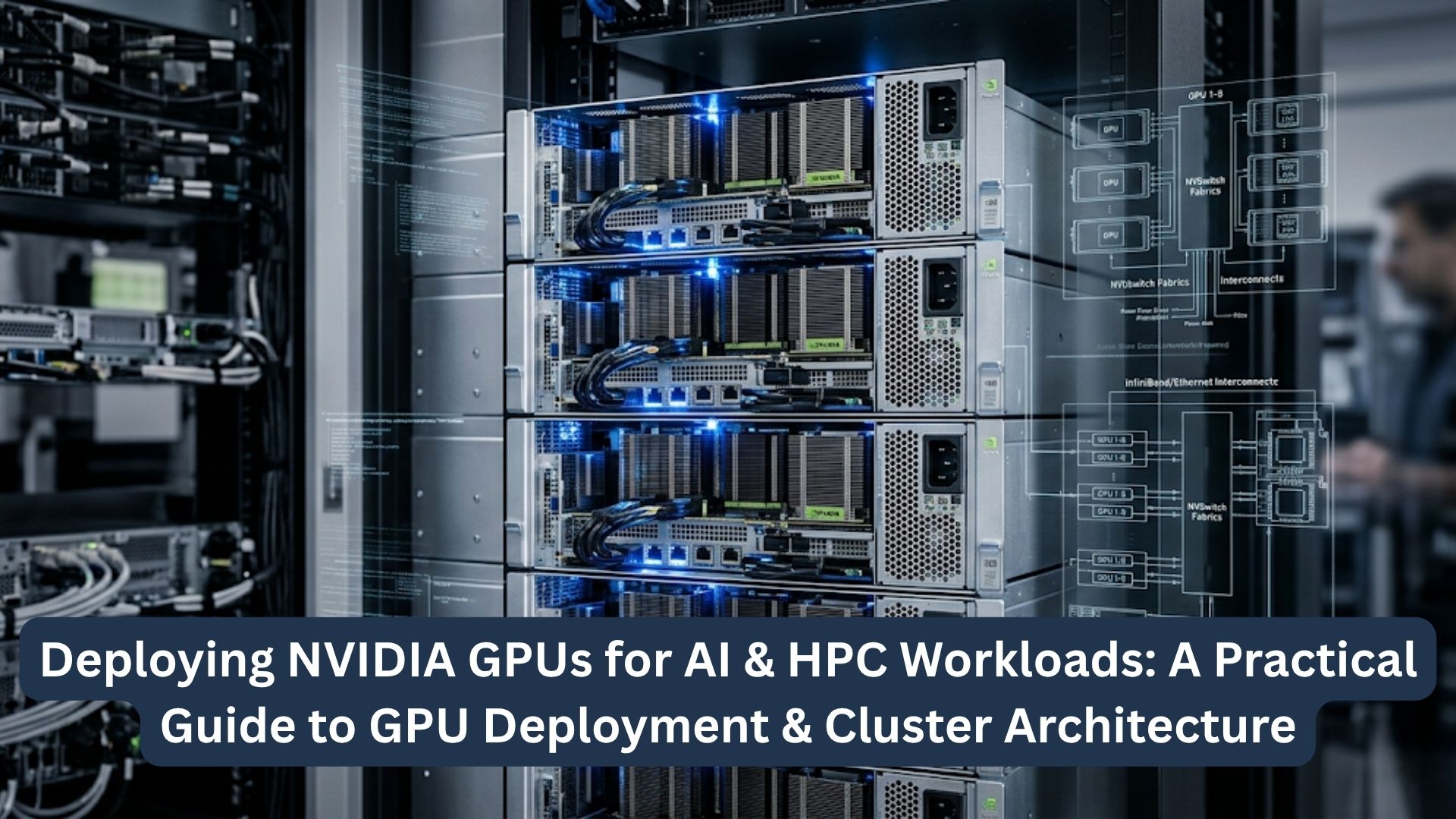
AI and HPC teams are no longer treating GPUs as optional accelerators. In many environments, GPUs now shape the full infrastructure plan, from server design and cluster networking to storage throughput and power delivery. That change is pushing organizations to rethink how they deploy computers so systems can support both current demand and future growth.
A practical GPU deployment strategy is not only about choosing powerful hardware. It depends on aligning workload behavior with the right node design, interconnect, software stack, and facility readiness. Teams that make those decisions carefully are more likely to achieve strong utilization, fewer bottlenecks, and a smoother path from pilot systems to production clusters.
Key Takeaways:
- AI training, inference, and HPC workloads need different GPU, network, storage, and scheduling architectures.
- NVIDIA platform choice depends on workload scale, memory needs, interconnect bandwidth, node density, and operational constraints.
- GPU clusters perform best when compute, networking, storage, software, power, and cooling are planned together.
- Production-ready GPU infrastructure requires phased deployment, strong monitoring, tenant controls, and room for modular expansion.
Understanding AI vs. HPC GPU Workload Requirements
Different GPU workloads stress different parts of the stack. Before selecting hardware or designing a cluster, teams should understand what the workloads actually need.
AI training workloads
AI training is typically the most infrastructure-intensive GPU use case. Large model training often needs multiple GPUs in a node and, in many cases, communication across many nodes. That places heavy demands on networking, GPU interconnects, and storage throughput.
Training environments also rely on steady data delivery. If storage cannot feed the GPUs consistently, utilization drops. This is one reason many organizations evaluating large-scale training begin with GPU server design before finalizing the wider cluster architecture.
AI inference workloads
Inference workloads are usually more sensitive to latency, efficiency, and service stability than to pure training scale. They may run on fewer GPUs per node, but they can still become demanding when model sizes grow or request volume increases.
For inference, teams usually focus on:
- Response time
- Model memory footprint
- Batch size efficiency
- Service availability
- Multi-tenant resource sharing
Traditional HPC simulation workloads
Traditional HPC workloads such as computational fluid dynamics, weather modeling, or molecular simulation often depend on tightly coupled parallel execution. These applications are usually sensitive to network latency and benefit from fast node-to-node communication.
HPC environments often place more emphasis on:
- MPI performance
- Low-latency fabric design
- Parallel file system throughput
- Stable long-duration execution
- Predictable scheduling
Converged AI + HPC environments
A growing number of organizations want one environment that can support both simulation and AI workflows. That may include simulation-driven data generation, AI-assisted analysis, or model training on scientific outputs.
These converged environments are attractive, but they are harder to design well. The cluster has to support mixed scheduling patterns, different storage behaviors, and multiple software requirements. In these cases, a clear GPU deployment strategy helps teams avoid building infrastructure that only fits one side of the workload mix.
| Workload type | Main priority | Infrastructure pressure points |
| AI training | Scale and throughput | GPU interconnect, east-west networking, storage throughput |
| AI inference | Latency and efficiency | GPU memory fit, orchestration, service reliability |
| HPC simulation | Low-latency parallelism | Fabric latency, shared storage, scheduling stability |
| Converged AI + HPC | Flexibility across mixed jobs | Scheduling, storage balance, software compatibility |
Choosing the Right NVIDIA GPU Platform
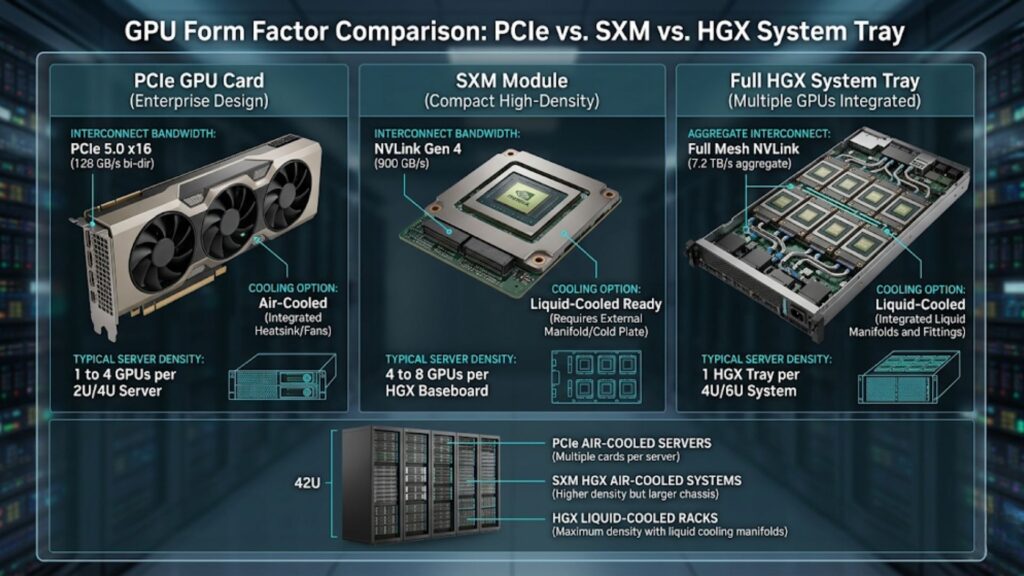
Platform selection affects density, cooling, serviceability, and long-term flexibility. The best option depends on workload scale and operational constraints, not only peak performance.
PCIe vs. SXM vs. HGX platforms
PCIe GPU deployments are often easier to integrate into standard enterprise server designs. They can work well for inference, smaller training environments, and organizations that value flexibility and familiar service models.
SXM-based systems are usually chosen when higher performance, greater GPU-to-GPU bandwidth, and denser acceleration matter more. HGX platforms extend that approach by enabling tightly integrated, high-performance GPU nodes for demanding AI and HPC workloads.
In enterprise deployments, NVIDIA-certified systems can help reduce compatibility and firmware risks when matching GPU platforms to production infrastructure.
Single-node vs. multi-node deployment decisions
Some workloads perform well inside a single node with several GPUs. Others quickly outgrow that design and need multi-node scaling. That decision affects not just hardware cost, but also network architecture, storage design, and orchestration requirements.
A single-node design is often suitable when:
- Models fit within local GPU memory
- Workloads do not require distributed training
- Operational simplicity matters
- Network dependence should stay limited
Multi-node deployments are often better when:
- Distributed training is required
- Simulation jobs span many nodes
- Teams need larger shared compute pools
- Future growth is already expected
Matching GPU type to workload scale
Not every project needs the highest-end GPU. Mid-range inference, small model development, and targeted HPC use cases may perform well on lower-density or lower-cost platforms. Larger model training and large-scale scientific workloads usually need stronger memory capacity, faster interconnects, and denser acceleration.
Teams should start with workload profiling instead of product preference. Oversizing can waste budget, while undersizing can create bottlenecks that are expensive to fix later.
Memory, interconnect, and form-factor considerations
GPU memory capacity matters across both AI and HPC. Large models, big batch sizes, and memory-heavy simulation workloads can all hit hard limits quickly. Interconnect bandwidth also becomes critical when jobs span many GPUs or nodes.
Form factor matters as well. Dense nodes can deliver more performance per rack, but they also increase demands on power, cooling, and service access. That trade-off should be evaluated early, especially when teams are planning AI-ready systems that may scale over time.
| Platform choice | Best fit | Main trade-off |
| PCIe | Flexible enterprise deployments, inference, smaller training clusters | Lower GPU-to-GPU bandwidth in some designs |
| SXM | High-performance training and dense acceleration | Higher power and cooling demands |
| HGX | Large-scale AI and HPC nodes with strong integration | More complex infrastructure planning |
| Single-node | Simpler deployment and management | Limited horizontal scale |
| Multi-node | Distributed training and larger HPC workloads | Greater dependence on network and storage design |
Core Building Blocks of GPU Cluster Architecture
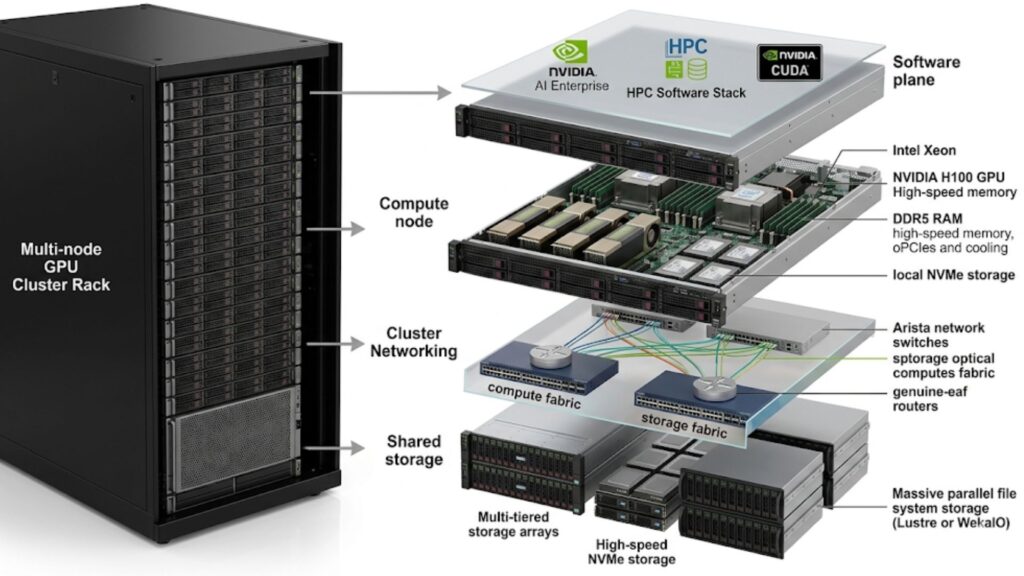
A GPU cluster only performs well when its main layers are balanced. Fast accelerators cannot make up for weak networking, slow storage, or poor management design.
Compute nodes
Compute nodes form the core of the cluster. They house CPUs, GPUs, system memory, and local storage. The node design should match the expected workload profile, including GPU density, host CPU needs, and memory balance.
GPU interconnect layer
Inside the node, GPU interconnects determine how efficiently GPUs exchange data. This matters greatly for tightly coupled training jobs and some HPC applications. Weak intra-node communication can reduce the benefit of adding more GPUs into the same server.
Cluster networking layer
The cluster network connects nodes to each other and to shared storage. In AI and HPC, east-west traffic is often much heavier than in standard enterprise environments. That means the network has to be designed for bandwidth and low congestion, not just baseline connectivity.
Storage layer
Storage needs to keep pace with the compute layer. Training jobs need sustained data feeds, while HPC jobs often depend on shared access to large datasets. Checkpointing, model artifacts, and intermediate files can all add more pressure.
Management and control layer
Provisioning, monitoring, scheduling, updates, and policy enforcement all sit in this layer. As clusters grow, good management becomes one of the clearest differences between a lab system and a production-ready platform.
Designing the Right Deployment Model
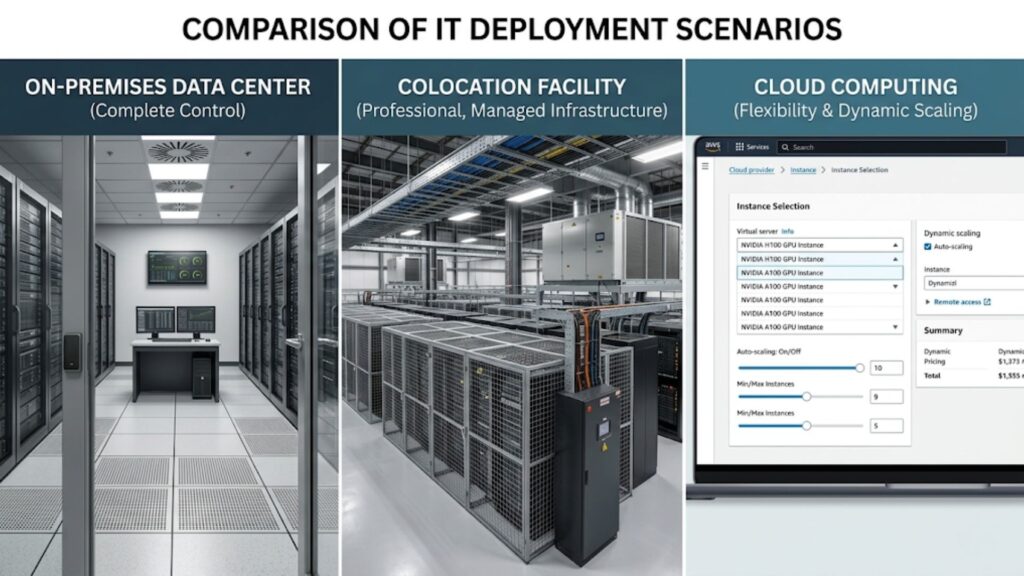
There is no single deployment model that fits every GPU workload. The right choice depends on performance goals, compliance needs, budget, facility readiness, and how fast capacity requirements may change.
On-premises GPU clusters
On-premises deployment gives teams direct control over hardware choices, data governance, and performance tuning. It is often preferred for sensitive data, steady-state HPC environments, and organizations that want long-term infrastructure ownership.
Colocation deployments
Colocation can be a strong option when teams want dedicated GPU infrastructure without expanding their own data center footprint. It can also help when higher rack densities or stronger cooling capabilities are available off site.
Cloud-based GPU environments
Cloud GPU environments are useful for pilot projects, short-term scaling, or burst capacity. Public cloud platforms such as AWS and Microsoft Azure are common examples when organizations need quicker access to GPU resources without waiting for hardware procurement.
Still, cloud economics, data transfer, and workload predictability should be evaluated carefully before using cloud as a permanent default.
Hybrid deployment models
Hybrid models combine local infrastructure with colocation or cloud capacity. They work best when organizations want baseline control on premises while keeping an option for temporary scale-out during peak demand.
Network Architecture for AI & HPC Clusters
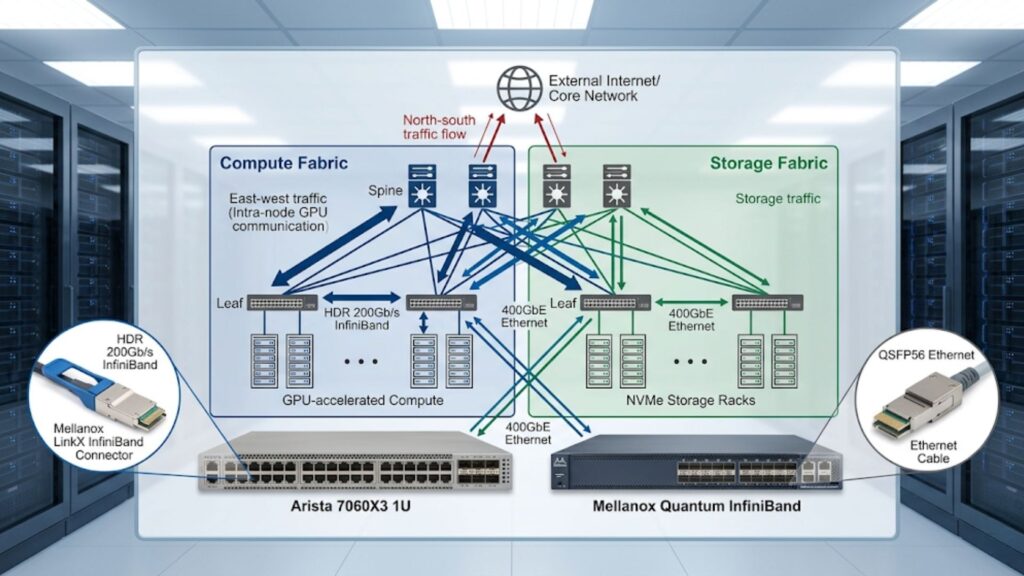
In GPU clusters, networking often decides whether the environment performs as expected.
East-west traffic design
AI training and HPC jobs generate large amounts of east-west traffic as nodes exchange gradients, parameters, or simulation data. This is very different from conventional enterprise infrastructure, where north-south traffic may dominate.
Teams that underestimate this shift often build clusters with powerful GPUs but weak overall performance. That is why many organizations now evaluate cluster network demands early in the planning cycle.
InfiniBand vs. Ethernet for GPU clusters
InfiniBand is often chosen for the lowest-latency, highest-performance HPC and distributed AI environments. Ethernet remains attractive because it is flexible, widely understood, and often easier to integrate with existing operational practices.
The right choice depends on:
- Application sensitivity to latency
- Cluster size
- Budget limits
- Operational skill set
- Existing data center standards
Spine-leaf topology
Spine-leaf designs are common in scalable GPU clusters because they support predictable east-west bandwidth across many nodes. They are especially useful in environments expected to expand over time.
In larger GPU clusters, switching vendors such as Arista may enter the design discussion when teams build scalable spine-leaf fabrics for east-west traffic.
| Network design area | Why it matters |
| East-west traffic | Drives communication efficiency in distributed AI and HPC jobs |
| Fabric type | Affects latency, throughput, and operational complexity |
| Spine-leaf topology | Supports scalable bandwidth across more nodes |
| Oversubscription planning | Prevents congestion under production loads |
Storage Architecture for GPU-Accelerated Workloads
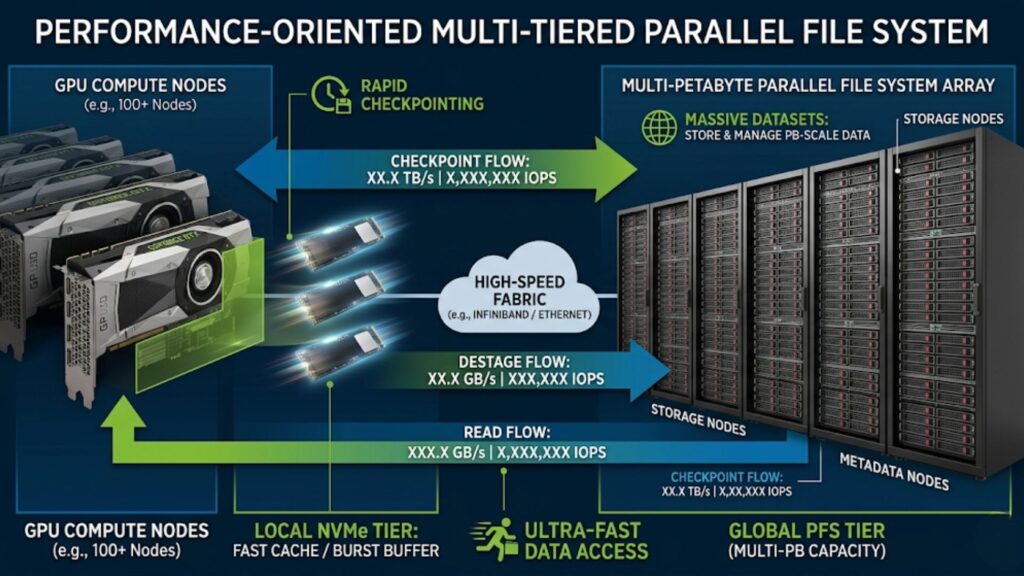
Storage design has a direct effect on GPU utilization and job completion time. Many performance problems blamed on compute are actually storage problems.
High-throughput data pipelines
Training jobs need fast, reliable data delivery. If the storage layer cannot keep GPUs fed with data, throughput drops and cluster economics weaken.
Parallel file systems and shared storage
Larger HPC and training environments often depend on shared storage that can serve many nodes at once. Parallel file systems are common where many workloads need concurrent high-performance access to the same data pool.
Checkpointing and model artifact storage
Checkpointing protects long-running jobs from failure, but it also creates bursts of storage traffic. Model artifacts, logs, and intermediate outputs need a storage plan that does not interfere with active workloads.
Data locality and I/O bottlenecks
Data locality helps reduce repeated transfers and improve efficiency. Local NVMe tiers, caching approaches, and thoughtful data placement can all reduce I/O pressure and keep the compute layer moving.
Power, Cooling, and Data Center Readiness
GPU deployment planning is incomplete until the facility is ready to support it.
Rack density planning
Modern GPU systems can consume far more power per rack than traditional enterprise servers. Dense deployments can quickly exceed old assumptions for rack power and thermal load.
Air cooling vs. liquid cooling
Air cooling may still work for some deployments, especially at modest density. But as GPU power rises, liquid cooling becomes more relevant. The right approach depends on density targets, service preferences, and data center design.
Power delivery and redundancy
Power planning should cover rack draw, redundancy design, PDUs, UPS capacity, and fault tolerance. Even well-designed clusters can become unstable if the power path is not matched to real operating conditions.
Space, cabling, and floor readiness
Physical layout affects deployment speed and long-term maintainability. Cable routing, rack spacing, service access, and floor loading should all be reviewed early.
Software Stack for NVIDIA GPU Deployment
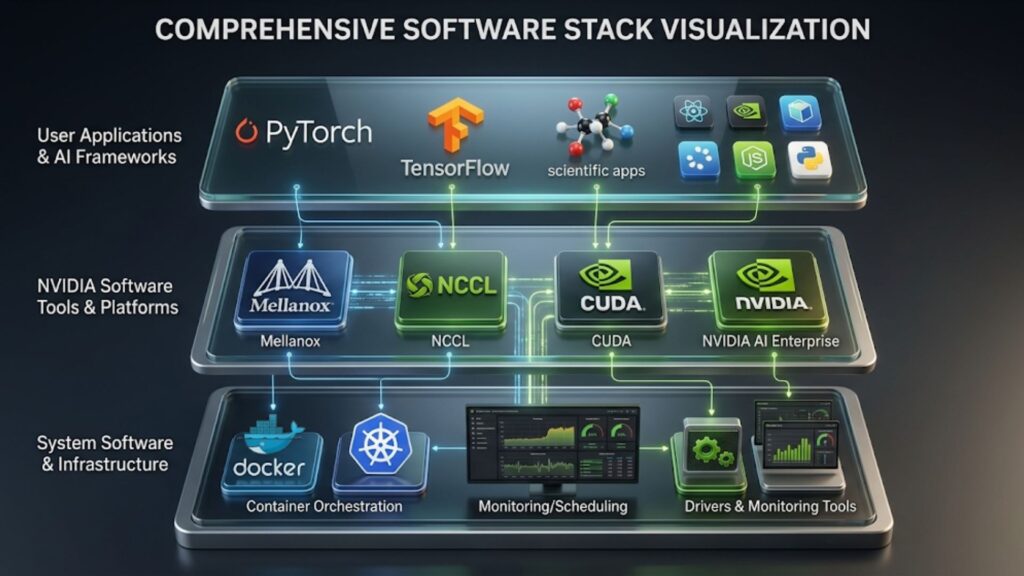
Hardware alone does not make a GPU environment production-ready. Software defines how usable, stable, and manageable the environment becomes.
Drivers, CUDA, and system software
CUDA and NVIDIA software tools often shape deployment decisions as much as the hardware itself, especially in multi-user or production cluster environments.
Version alignment matters. Drivers, firmware, libraries, and operating system support should be validated together so updates do not create instability.
Containerization and orchestration
Containers make it easier to package applications consistently across nodes and environments. Orchestration adds control over placement, scaling, and lifecycle management in shared clusters.
Cluster provisioning and lifecycle management
Provisioning tools help standardize builds and reduce configuration drift. Lifecycle management becomes increasingly important as environments grow and hardware generations change.
Monitoring, scheduling, and resource allocation
Operational visibility is essential. Teams should monitor GPU utilization, thermal behavior, storage throughput, memory pressure, and network performance. Scheduling policies should support fair access and efficient use.
Security and Multi-Tenant Cluster Governance

As GPU infrastructure becomes shared and mission-critical, governance becomes part of the architecture.
Access control and tenant isolation
Multi-user clusters need clear identity controls and resource boundaries. Teams should define who can use which resources and under what conditions.
Data security and compliance
Sensitive datasets, model weights, and simulation outputs may all require stronger protection. Encryption, logging, retention rules, and controlled data movement should be planned early.
Network segmentation and policy governance
Management traffic, storage traffic, and user workload traffic should be separated where appropriate. Policy-driven controls such as quotas, software standards, and job priority rules also help maintain order as cluster use grows.
From Pilot to Production
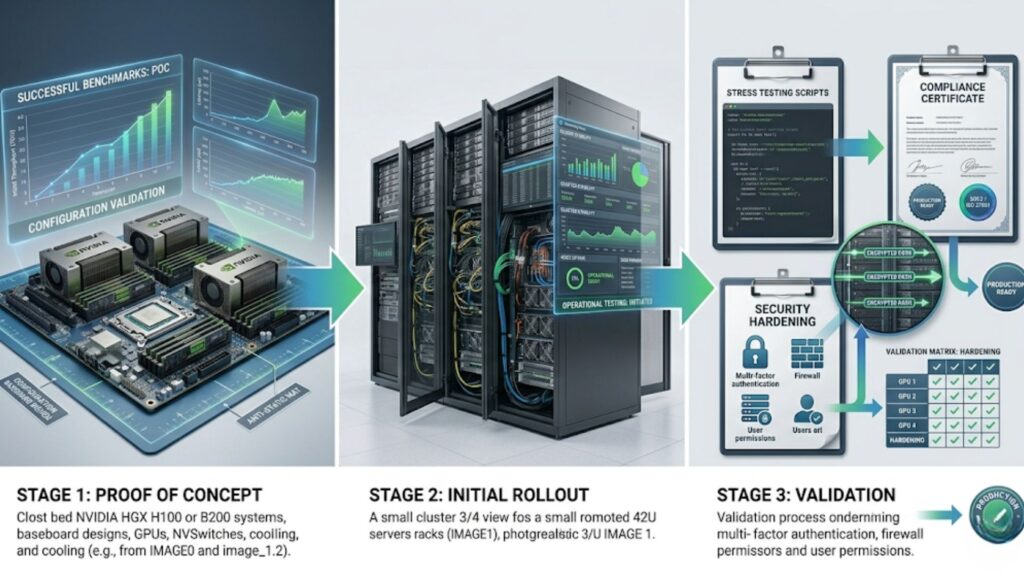
Successful GPU environments usually grow in stages rather than appearing at full scale immediately.
Proof of concept
The proof of concept stage helps validate workload fit, software compatibility, and expected performance. It is the right time to identify hidden bottlenecks before broad investment.
Initial rollout
The first production rollout should focus on operational stability rather than maximum size. Teams should verify node behavior, scheduling, storage performance, and monitoring coverage before expanding.
Validation and hardening
Benchmarking should use real workloads whenever possible. Once the platform proves stable, organizations can strengthen governance, security, and support processes before broader expansion.
Common GPU Deployment Challenges and How to Avoid Them
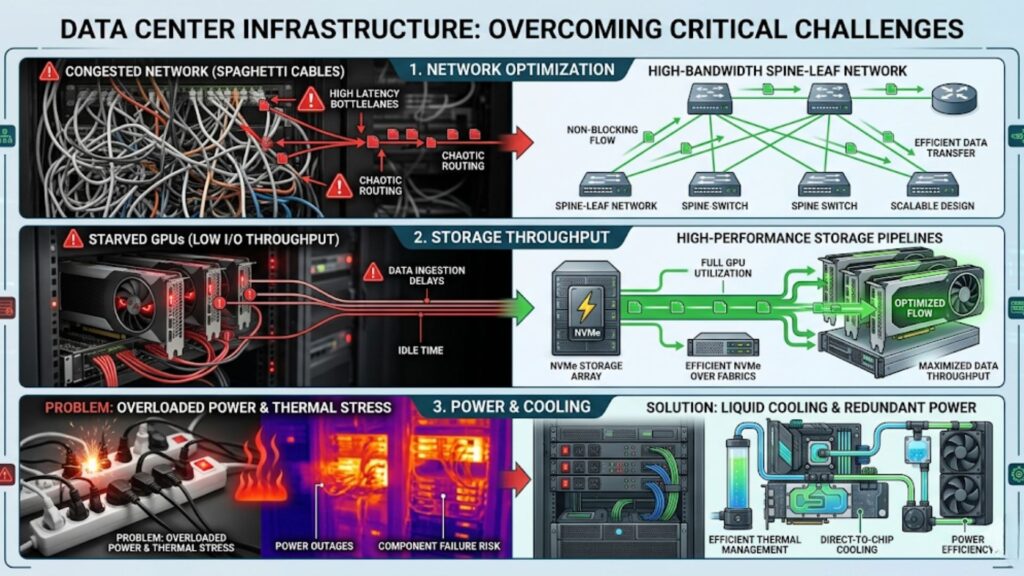
Many deployment problems are predictable if teams know where to look.
Underestimating networking requirements
Clusters often underperform because teams focus on GPU selection but treat the network as secondary. In distributed AI and HPC, the network is part of the compute path.
Storage starvation
Fast GPUs expose weak storage quickly. If datasets, checkpoints, or shared files cannot move at the required speed, utilization drops.
Power and thermal constraints
Power and cooling issues can delay deployment or force density compromises. These limits should be validated before finalizing node counts and rack plans.
Low GPU utilization and poor scheduling
Low utilization is often caused by poor scheduling, weak observability, slow input pipelines, or imbalanced system design. More GPUs alone rarely solve that problem.
Comparing NVIDIA with Alternative Platforms
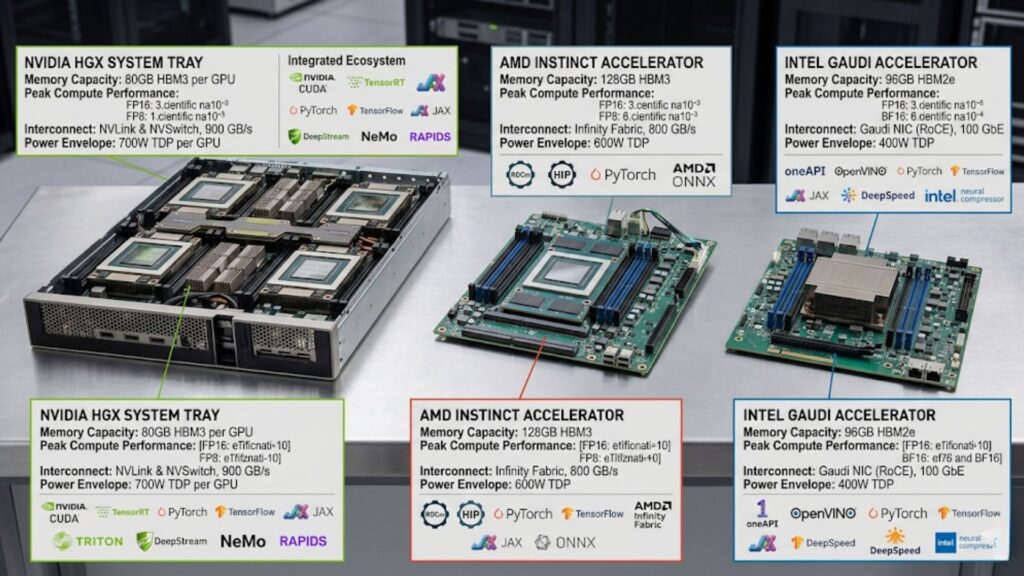
NVIDIA is often the main reference point in GPU planning, but many buyers still compare it with other options.
NVIDIA vs AMD for AI and HPC evaluation
AMD may be considered for memory capacity, price-performance positioning, and fit in selected HPC or mixed compute environments. The trade-off often comes down to software ecosystem maturity and operational familiarity.
NVIDIA vs Intel for deployment flexibility and software support
Intel accelerators may be considered when teams prioritize platform alignment or broader enterprise consistency. In many cases, the comparison centers on software support and how easily the platform fits into existing operations.
Ecosystem maturity and operational trade-offs
Some buyers also compare AMD and Intel accelerators with NVIDIA when evaluating memory capacity, software maturity, and operational familiarity across AI and HPC environments.
Need Support with NVIDIA GPU Infrastructure Planning?
Catalyst Data Solutions Inc helps teams design and deploy NVIDIA-based AI and HPC environments with the right balance of performance, scalability, and infrastructure readiness.
That can include node selection, storage and network planning, deployment models, and facility preparation based on real workload requirements.
FAQ
What is the best NVIDIA GPU deployment model for AI and HPC workloads?
The best deployment model depends on workload scale, data sensitivity, budget, and growth plans. On-premises clusters suit steady, high-performance environments, while cloud and hybrid models support flexibility and burst capacity.
How do I choose the right NVIDIA GPU platform for my workload?
Start with workload requirements such as training scale, inference latency, memory demand, and inter-GPU communication. Then compare PCIe, SXM, and HGX options based on performance, density, cooling, and expansion needs.
What network architecture works best for GPU clusters?
GPU clusters usually perform best with a network built for heavy east-west traffic, low latency, and high bandwidth. Spine-leaf designs are common, with InfiniBand or Ethernet selected based on performance and operational goals.
Why is storage important in NVIDIA GPU deployments?
Storage directly affects GPU utilization because training and HPC jobs need fast, consistent access to data. Weak storage performance can starve GPUs, slow checkpointing, and reduce overall cluster efficiency.
What are the most common GPU deployment mistakes to avoid?
Common mistakes include underestimating network requirements, overlooking storage bottlenecks, ignoring power and cooling limits, and failing to plan for scheduling, monitoring, and long-term cluster growth.