


Remote and hybrid work did more than change where people work. It changed where risk lives. Sensitive business data now moves through laptops, mobile devices, home networks, and cloud apps every day, often far outside the visibility of a traditional office-based security model.
That shift made the endpoint one of the most important control points in modern cybersecurity. A single compromised device can give attackers a path to stolen credentials, ransomware activity, unauthorized SaaS access, or exposed company data.
For distributed organizations, effective protection now depends on more than a secure network edge. It depends on strong endpoint security solutions that can verify device health, enforce access policies, and reduce risk wherever work happens.
Key Takeaways:
- Distributed work makes endpoints a primary security layer because users access data from many devices, networks, and cloud apps.
- Core endpoint security controls include EDR, patch management, encryption, MFA, conditional access, and UEM or MDM.
- The biggest distributed workforce risks include phishing, ransomware, unpatched devices, BYOD exposure, shadow IT, and lost devices.
- Strong endpoint security improves when combined with Zero Trust, secure remote access, and identity-aware policy enforcement.
What Endpoint Security Means for Distributed Workforces
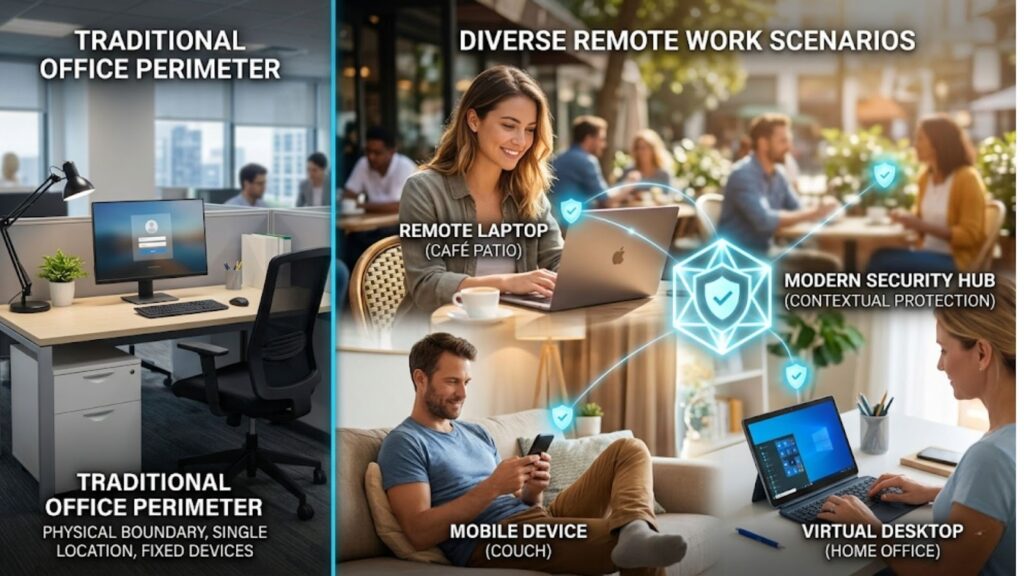
Endpoint security is the set of technologies and policies used to protect devices that connect to company systems, applications, and data. It covers prevention, detection, response, compliance, and visibility across the device estate.
What counts as an endpoint?
In a distributed workforce, endpoints include:
- Corporate laptops and desktops
- Personal laptops used for work
- Smartphones and tablets
- Virtual desktops
- Admin workstations
- Devices connecting to cloud and SaaS platforms
The challenge is not only the number of devices. It is the mix of locations, operating systems, ownership models, and access patterns.
Why perimeter-only security is no longer enough
Older security models assumed users and devices operated inside a trusted network boundary. That assumption no longer fits remote work. Users now log in from many networks, while applications often live in SaaS and cloud platforms.
That is why endpoint protection now works best when combined with identity controls and zero trust planning. Security decisions need to follow the user and the device, not just the office network.
Main Risks in Distributed Environments
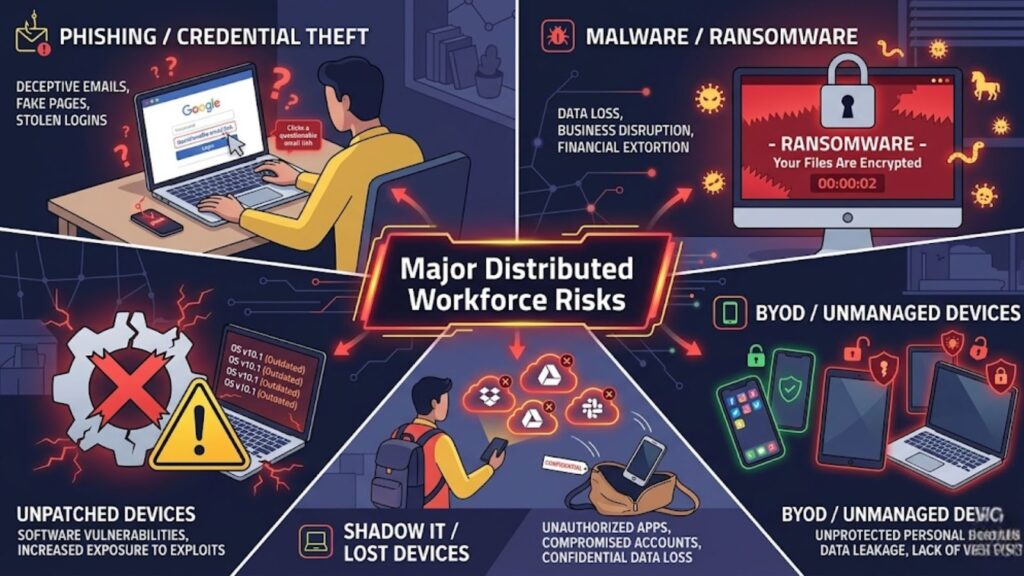
Remote and hybrid work create flexibility, but they also expand the attack surface. The most common risks include:
Phishing and credential theft
Phishing remains one of the fastest ways to compromise remote users. Attackers target email, text messages, collaboration tools, and fake login pages to steal credentials or session tokens.
Because distributed teams rely heavily on cloud logins, one stolen account can open access to multiple systems.
Malware and ransomware
Endpoints remain a common entry point for ransomware and malware. A user may click a malicious attachment, install unsafe software, or access a compromised website.
In distributed environments, delayed visibility can make containment harder.
Unpatched devices
Unpatched systems and applications give attackers known weaknesses to exploit. This problem grows when devices rarely connect to the office or fall outside normal update workflows.
A strong security operations strateg depends on patch discipline and clear remediation ownership.
BYOD and unmanaged devices
Bring-your-own-device programs often improve flexibility, but they can reduce control. Personal devices may lack encryption, endpoint protection, approved software, or current updates.
Shadow IT and lost devices
Remote users often adopt unsanctioned apps for file sharing, messaging, or productivity. That spreads company data across systems security teams do not control.
Lost or stolen endpoints add another risk, especially if they contain local files, saved credentials, or active sessions.
Core Controls Every Organization Needs
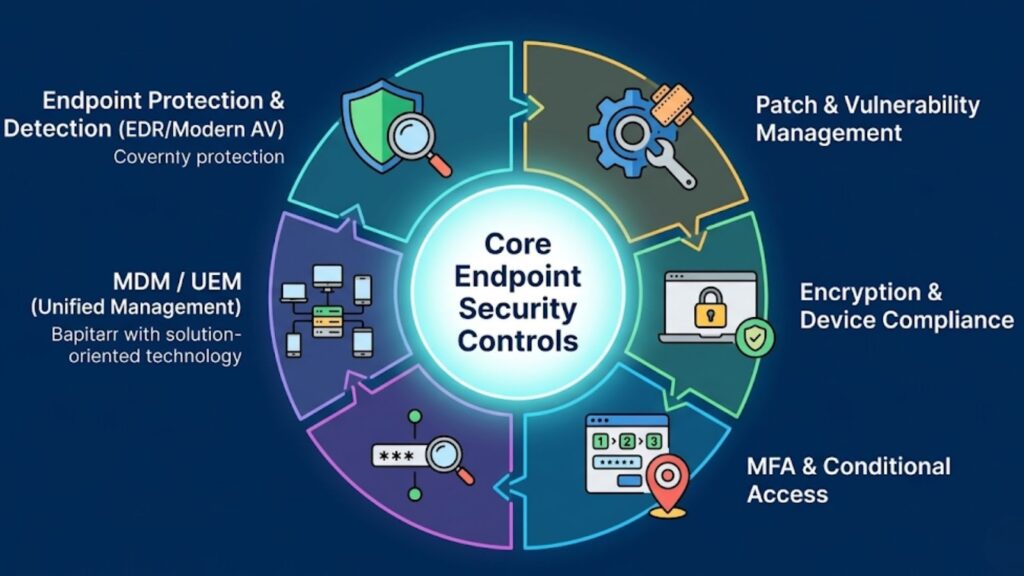
Effective endpoint security for distributed teams starts with a focused set of controls.
Endpoint protection and detection
Modern endpoint controls should go beyond basic antivirus. They should support:
- Malware prevention
- Behavioral detection
- Endpoint detection and response
- Device isolation for compromised systems
- Investigation and alert workflows
Patch and vulnerability management
Organizations need a reliable process for updating operating systems, browsers, and third-party applications. Vulnerability management should also help security teams prioritize the issues that create the most exposure.
For vulnerability and exposure management, organizations often look at platforms such as Tenable to improve endpoint visibility and remediation prioritization.
Encryption and device compliance
Full-disk encryption helps protect data when a device is lost or stolen. Device compliance checks help ensure only approved and healthy systems can access business resources.
Common compliance checks include:
- Encryption enabled
- Supported OS version
- Required patches installed
- Security agent active
- Screen lock enabled
MFA and conditional access
Multi-factor authentication should protect email, SaaS apps, admin tools, and remote access systems. Conditional access strengthens this by checking device state, login risk, and user context before access is granted.
For identity-aware access, Microsoft Entra ID can support MFA and conditional access policies across distributed environments.
Mobile device management and unified endpoint management
MDM and UEM platforms help IT teams apply policies across laptops, phones, and tablets from a central console. They are especially valuable in remote environments because they support enrollment, policy enforcement, remote wipe, and device compliance at scale.
Endpoint Security Control Matrix for Distributed Workforces
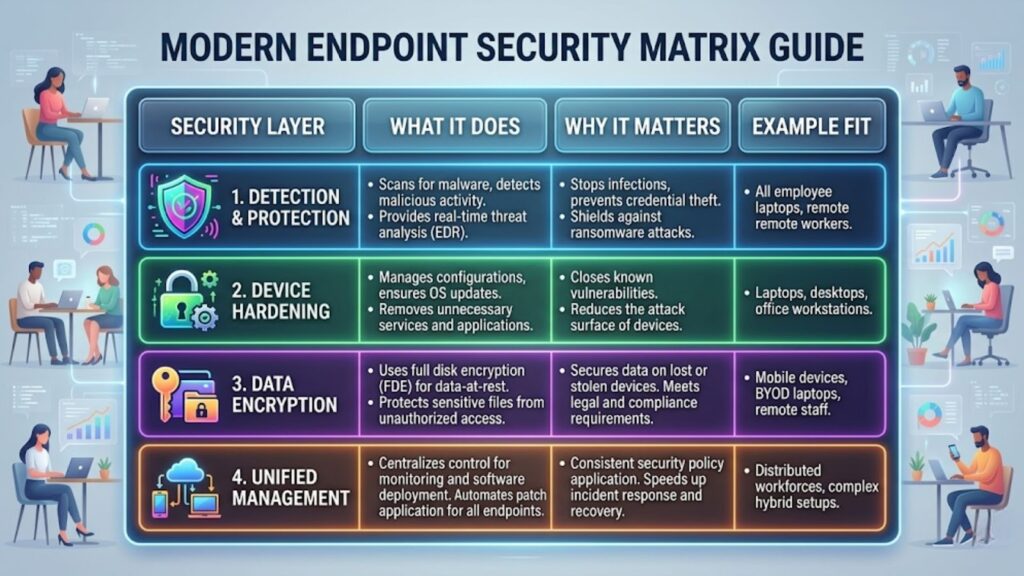
The framework below helps clarify which controls matter most and why.
| Security Layer | What It Does | Why It Matters | Example Fit |
| Endpoint protection and detection | Prevents malware and detects suspicious device behavior | Improves early threat detection and response | Remote laptop-heavy environments |
| Patch and vulnerability management | Finds missing updates and risky software weaknesses | Reduces exposure to known exploits | Mixed-device environments |
| Encryption and compliance | Protects stored data and validates device health | Lowers risk from lost, stolen, or noncompliant devices | Teams handling sensitive data |
| MFA and conditional access | Adds stronger authentication and risk-based access rules | Helps stop credential-based attacks | SaaS-first organizations |
| UEM or MDM | Applies policy across laptops and mobile devices | Improves consistency and remote administration | Hybrid and mobile workforces |
| Secure remote access | Protects user connections to apps and internal resources | Reduces risk from untrusted networks | Users connecting from many locations |
| Incident response playbooks | Defines steps for isolation and recovery | Speeds containment when devices are compromised | Any distributed organization |
Cloud and Zero Trust Layers That Strengthen Endpoint Security
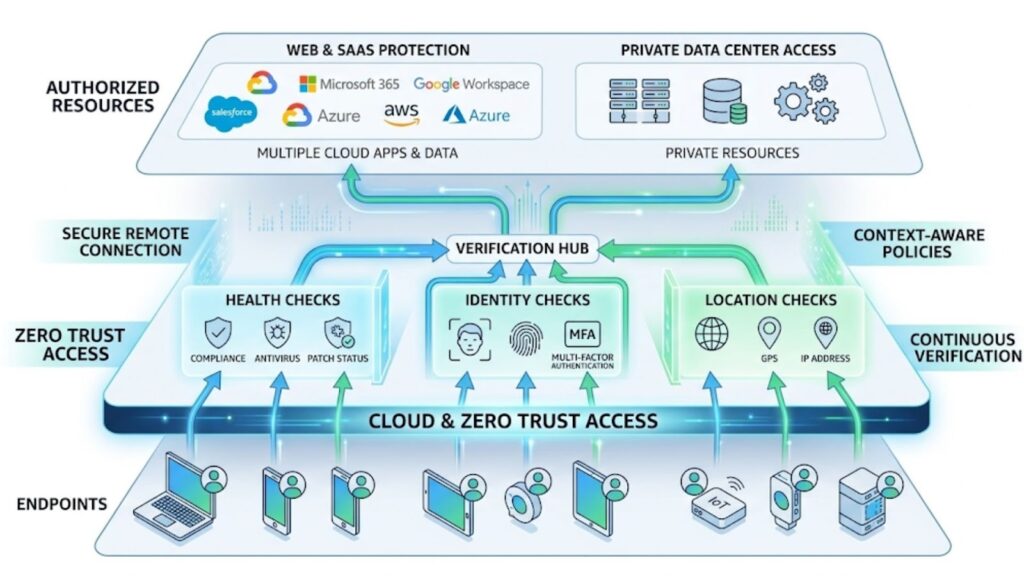
Endpoint controls are stronger when they work with identity, access, and cloud security layers.
Zero Trust access
Zero Trust access assumes no user or device should be trusted by default. Access is based on identity, device health, location, and policy rather than network position.
This model fits distributed teams because it protects access without extending broad trust to every connected device.
Secure access for remote users
Remote users need secure access to applications whether those apps live in the data center or the cloud. Many organizations now combine endpoint posture checks with modern remote access controls instead of relying only on legacy VPN models.
In this layer, organizations often evaluate endpoint, access, and network security categories that may include platforms from Palo Alto Networks or Fortinet, depending on architecture and operational needs.
Web and SaaS protection
Since remote users spend much of the workday in the browser, web and SaaS protection matter more than ever. Security teams need visibility into risky downloads, unsanctioned cloud apps, and data movement across SaaS platforms.
Best Practices for Deployment and Operations
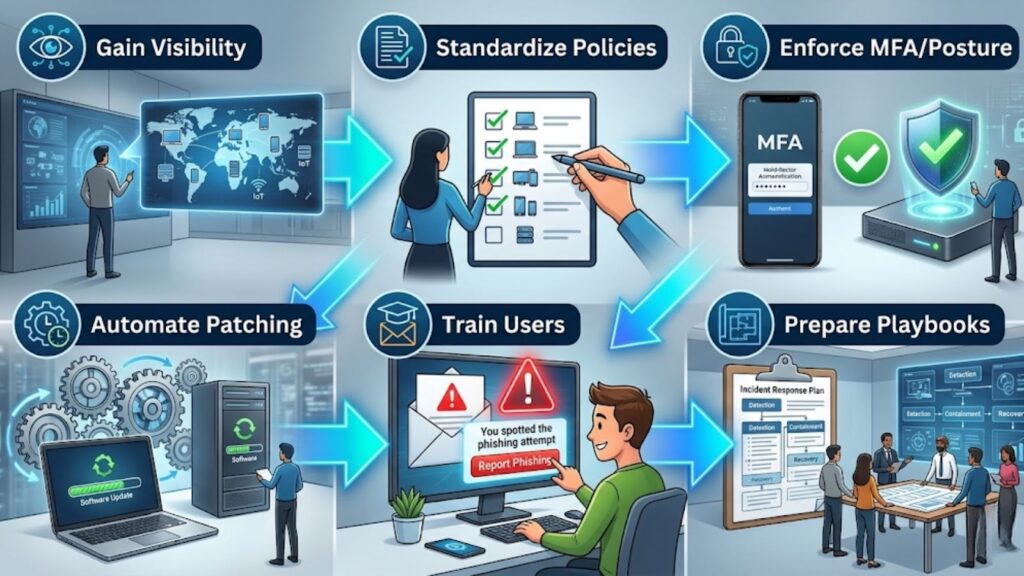
Strong tools alone do not create strong security. Organizations need disciplined deployment and operations.
Gain device visibility first
Start with a current inventory of endpoints, owners, operating systems, and management state. You cannot protect devices you cannot identify.
Standardize endpoint policies
Build a baseline policy for supported devices and user groups. That baseline should define encryption, patch levels, MFA, screen lock, and response requirements.
Enforce MFA and posture checks
Passwords alone are not enough. Require MFA across the environment and connect access decisions to device compliance whenever possible.
Automate patching
Manual patching does not scale well across remote environments. Centralized automation improves coverage and reduces delay.
Train users on phishing
User awareness still matters. Training should focus on modern phishing tactics, suspicious prompts, unsafe file-sharing messages, and clear reporting procedures.
Prepare response playbooks
Security teams should have clear steps for compromised devices, including isolation, account lockout, investigation, and recovery. This becomes easier with aligned tooling and deployment support.
Distributed Workforce Endpoint Security Implementation Checklist
Use this checklist to guide rollout and operations:
- Build a full inventory of endpoints
- Separate managed, unmanaged, and BYOD devices
- Enforce full-disk encryption
- Deploy endpoint protection and detection agents
- Enable MFA for critical applications
- Apply conditional access based on device posture
- Centralize OS and application patching
- Enroll devices into UEM or MDM
- Restrict risky apps and shadow IT
- Create playbooks for lost or compromised devices
- Test remote lock, wipe, and containment procedures
- Track compliance, remediation speed, and incident trends
How to Choose the Right Approach
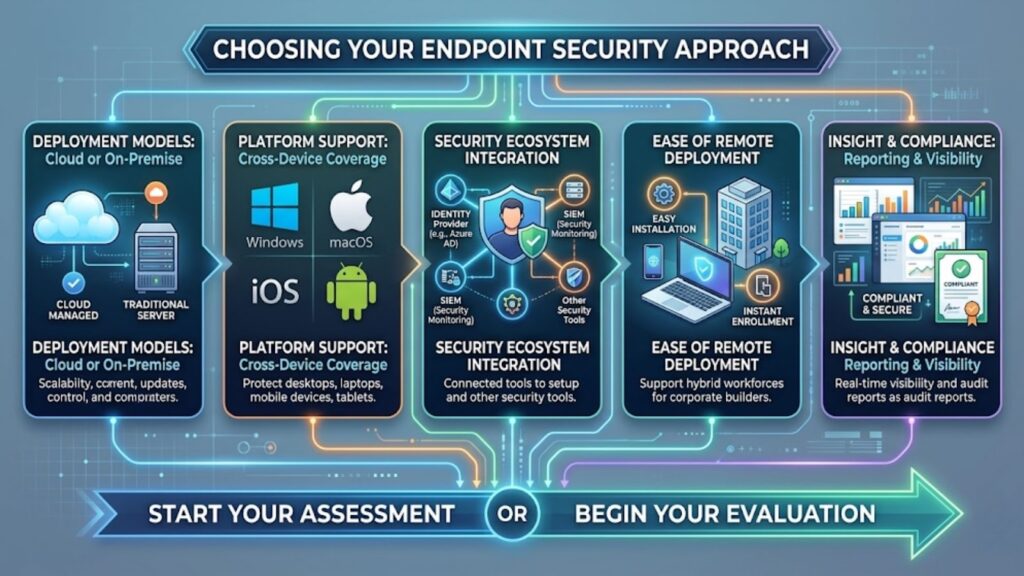
The best approach depends on workforce distribution, device mix, cloud usage, compliance needs, and internal staffing.
Focus on these factors:
- Cloud-managed vs. traditional tools: Cloud-managed platforms are often easier to deploy and operate for remote users.
- Cross-platform support: Security coverage should extend across Windows, macOS, iOS, Android, and other supported systems.
- Integration with identity and security tools: Endpoint controls should connect with identity, vulnerability management, and access systems.
- Ease of remote deployment: Enrollment and policy rollout should be simple for users outside the office.
- Reporting and compliance visibility: Security teams need clear insight into coverage, patch status, policy compliance, and threats.
Organizations that need additional operational support often benefit from broader managed IT support when scaling remote security programs.
How Catalyst Data Solutions Inc. Can Help
Need help securing remote and hybrid endpoints? Catalyst Data Solutions Inc. can help assess your endpoint security posture, align the right mix of endpoint, identity, and secure access controls, and source the solutions that fit your environment.
From architecture guidance to infrastructure modernization, Catalyst Data Solutions Inc. supports practical sourcing and deployment decisions for distributed workforces.
FAQ
What are endpoint security solutions?
Endpoint security solutions are tools and policies used to protect laptops, desktops, phones, tablets, and other devices that connect to business systems.
Why is endpoint security important for remote workers?
Remote workers connect from many locations and networks, which increases the risk of phishing, malware, credential theft, and unmanaged access.
What is the difference between antivirus and endpoint security?
Antivirus focuses mainly on malware detection. Endpoint security includes broader controls such as detection and response, compliance, patching, encryption, and access enforcement.
How does MFA improve endpoint security?
MFA helps stop attackers from using stolen passwords alone. When paired with device checks, it creates much stronger protection for remote access.
What are the biggest endpoint risks in a distributed workforce?
The main risks include phishing, ransomware, unpatched devices, BYOD exposure, shadow IT, and lost or stolen endpoints.
Can BYOD be secured effectively?
Yes, but only with clear policy, device compliance requirements, access controls, and limits on what unmanaged devices can reach.
What should organizations look for in endpoint security solutions?
They should look for strong detection, cross-platform coverage, remote deployment ease, integration with identity tools, and clear compliance reporting.