

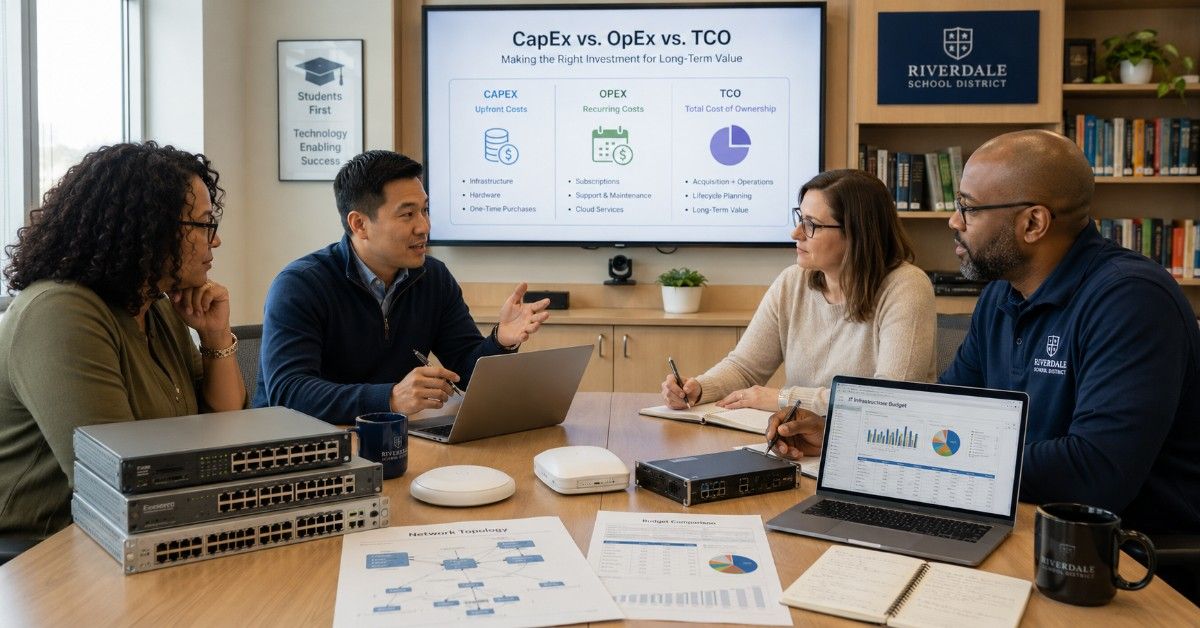
CapEx, OpEx, and TCO help K-12 schools, libraries, and SLED buyers compare the real cost of IT infrastructure. They show how a purchase affects today’s budget, future operating costs, and long-term value.
This matters when teams plan switches, wireless access points, firewalls, servers, storage, cloud subscriptions, licensing, and support. The lowest quote does not always create the lowest cost over time.
For school IT directors, library technology managers, district procurement teams, and SLED buyers, the goal is simple: choose infrastructure that fits the budget, supports users, and avoids costly surprises later.
What Do CapEx, OpEx, and TCO Mean for IT Infrastructure?
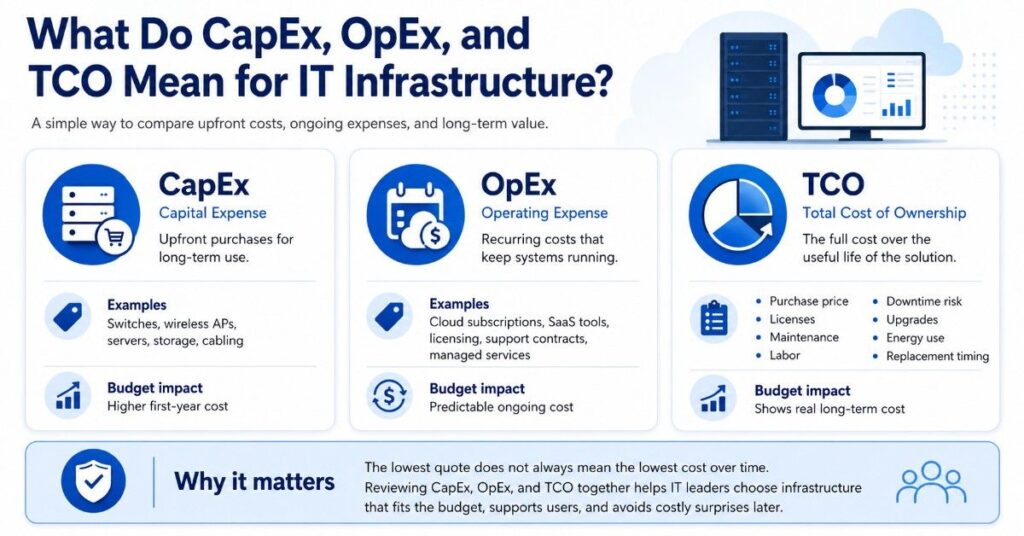
CapEx means capital expense. In IT procurement, it usually refers to larger purchases that create long-term value. A school may use CapEx to buy switches, wireless access points, servers, storage arrays, cabling, or firewall hardware.
OpEx means operating expense. In IT procurement, it usually refers to recurring costs that keep systems running. This can include cloud subscriptions, SaaS tools, licensing renewals, support contracts, security services, and monthly managed services.
TCO means total cost of ownership. TCO looks beyond the first invoice. It includes purchase price, licenses, maintenance, labor, downtime risk, upgrades, support, warranty, energy use, lifecycle, and replacement timing.
| Term | Simple Meaning | Common IT Examples | Budget Impact |
| CapEx | Upfront purchase for long-term use | Switches, APs, servers, storage, cabling | Higher first-year cost |
| OpEx | Recurring cost to operate services | Cloud tools, subscriptions, support, licensing | Predictable ongoing cost |
| TCO | Full cost over the useful life | Hardware, labor, support, downtime, renewals | Shows real long-term cost |
A strong budget plan does not treat CapEx, OpEx, and TCO as separate ideas. It connects them. A lower CapEx price may increase OpEx later if the product needs more support, licensing, or replacement parts.
This is why many districts compare costs before a school network refresh instead of only asking which vendor has the lowest purchase price.
Why Does TCO Matter for K-12 and SLED IT Leaders?
TCO matters because public-sector IT teams must defend each purchase across several years. A firewall, switch stack, storage system, or wireless refresh can affect budgets long after the purchase order is approved.
According to Gartner’s April 2026 forecast, data center systems spending is projected to grow 55.8% in 2026 to nearly $788 billion, making TCO planning critical for K-12 and SLED IT infrastructure decisions.
This wider cost pressure can affect schools and public agencies even if they are not buying large data center systems. Server parts, storage drives, memory, optics, power supplies, and network hardware can all face pricing and availability changes.
K-12 and SLED teams also face budget pressure from device refresh cycles, cybersecurity needs, cloud tools, storage growth, bandwidth demand, and staffing limits. These demands often rise faster than funding, as many teams already see in tight IT budgets.
TCO gives decision-makers a better way to compare choices. It helps explain why a more complete quote may cost more upfront but reduce downtime, labor, and replacement risk over the full lifecycle.
How Do CapEx and OpEx Show Up in Real IT Purchases?
CapEx often appears in hardware-heavy projects. A district may buy Cisco Catalyst switches, HPE Aruba access points, Fortinet firewalls, Juniper switching, Arista data center switches, servers, storage, UPS units, optics, and cabling.
OpEx often appears when costs repeat each year or month. This may include firewall security subscriptions, cloud management licenses, wireless support, storage backup software, endpoint tools, or hosted services.
Most real projects include both. A Wi-Fi refresh may require access points and PoE switches as CapEx, plus cloud management, support, licensing, and maintenance as OpEx.
| Purchase Type | CapEx Items | OpEx Items | TCO Watchout |
| Switch upgrade | Switches, optics, stacking cables | Support, warranty, maintenance | Missing modules can delay deployment |
| Wireless refresh | APs, PoE switches, cabling | Cloud licenses, support | Licenses may grow each year |
| Firewall project | Appliance, modules | Security subscriptions, support | Renewal costs can be high |
| Storage refresh | Controllers, drives, shelves | Backup software, support | Capacity growth can change cost fast |
| Cloud service | Limited hardware | Monthly or annual subscription | Price can rise over time |
A buyer planning campus switching should compare the full hardware bundle, not only the switch chassis or base unit. Optics, stacking, power, support, and spare units can change the real cost.
Procurement teams should also check whether the quote includes everything needed for deployment. A low hardware price may not help if the team must place rush orders for licenses, cables, mounts, or transceivers later.
Should Schools Buy Hardware or Use Cloud and Subscription Models?
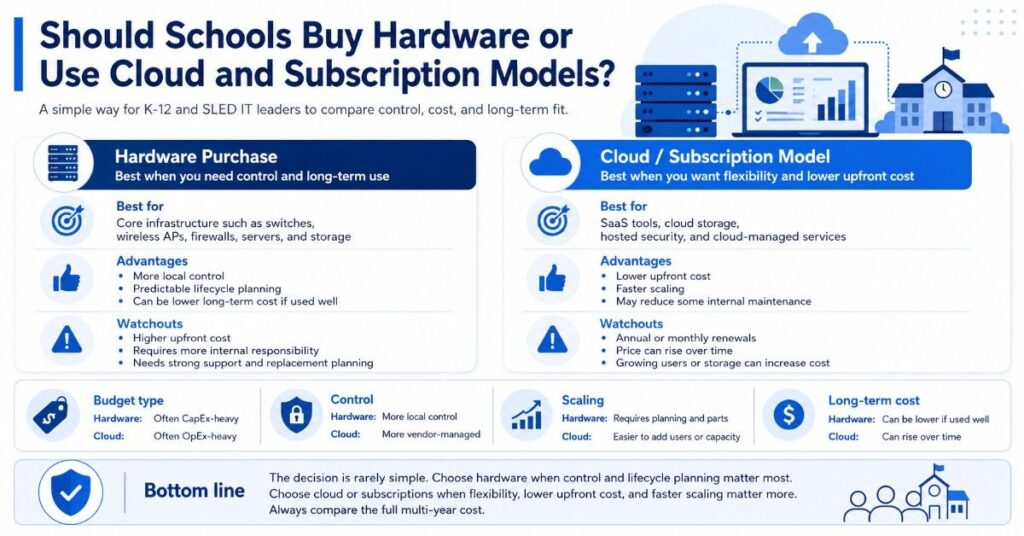
Buying hardware can make sense when a school or agency needs control, predictable lifecycle planning, and long-term use. Switches, APs, firewalls, servers, and storage often support core operations for several years.
Cloud and subscription models can make sense when teams want lower upfront cost, faster scaling, or less internal maintenance. This model is common for SaaS tools, cloud storage, hosted security, and cloud-managed wireless.
The decision is rarely simple. A cloud tool may reduce hardware needs but increase annual operating costs. A hardware purchase may cost more upfront but offer a clearer lifecycle if support and replacement plans are strong.
| Decision Area | Hardware Purchase | Cloud or Subscription Model |
| Budget type | Often CapEx-heavy | Often OpEx-heavy |
| Control | More local control | More vendor-managed |
| Scaling | Requires planning and parts | Easier to add users or capacity |
| Renewal risk | Support and warranty renewals | Annual price increases |
| Internal labor | More local responsibility | May reduce some maintenance |
| Long-term cost | Can be lower if used well | Can rise over time |
A cloud subscription that increases every year may look affordable in year one. Over five years, it may cost more than expected, especially when user counts, storage needs, or security features expand.
A hardware purchase also needs discipline. Servers, storage, and network equipment should fit a clear lifecycle plan. For broader infrastructure planning, IT hardware sourcing can help buyers compare new, refurbished, and available channel options.
What Hidden Costs Change the True Cost of IT Infrastructure?
Hidden costs are often the reason a project exceeds its budget. These costs may not appear in the first quote, but they can affect deployment, performance, support, and lifecycle planning.
Common hidden costs include maintenance, support, downtime, security renewals, upgrade labor, training, licensing, spare parts, shipping delays, and compatibility issues. A missing support contract or wrong optic can create real operational risk.
Buyers should watch for these cost areas:
- Maintenance and support contracts
- Security subscriptions and renewals
- Cloud or management licensing
- Warranty gaps
- Downtime during failure or replacement
- Labor for installation and troubleshooting
- Training for new tools or platforms
- Spare parts and replacement units
- Cabling, optics, mounts, and power supplies
- End-of-life or end-of-support risk
Security costs deserve special attention. A new firewall may require multi-year threat protection, web filtering, support, logging, and firmware updates. The appliance price is only one part of the total cost.
Network costs also grow when teams skip compatibility checks. A switch upgrade may require new optics, higher PoE capacity, different stacking cables, or cabling work. These details matter in modern infrastructure planning.
How Do New, Refurbished, and Hard-to-Find Options Affect TCO?
Step 1: Identify where new hardware fits best
New hardware often makes sense when standardization, warranty alignment, long lifecycle, and full support coverage matter most. This is common for core switching, production firewalls, wireless refreshes, and environments where uptime and consistency are critical.
Step 2: Evaluate where refurbished hardware adds value
Refurbished hardware can support spares, expansions, labs, replacements, and non-critical environments. It is also useful for legacy systems where matching existing infrastructure matters. This approach helps stretch budgets without forcing a full platform replacement.
Step 3: Use hard-to-find hardware to avoid full redesigns
Hard-to-find hardware can protect TCO when only a specific component is needed. For example, a compatible line card or switch may keep a network stable. This targeted replacement often costs less than redesigning the entire environment.
Step 4: Compare fit, not just price
The key is fit. Refurbished does not always mean lower TCO. Buyers should review testing standards, warranty terms, support options, compatibility, and lifecycle alignment before making a decision.
Step 5: Align purchases with funding rules
For E-Rate-related projects, schools and libraries should verify eligibility based on current program guidance. E-Rate can support certain connectivity and internal network infrastructure, but it should not be treated as a full hardware budget.
Step 6: Separate funded and non-funded needs
Buyers should separate E-Rate-funded scope from broader infrastructure needs. A district may use E-Rate planning for eligible network equipment while using local funds for spares, devices, or other eligible network costs.
How Do Lead Times and Availability Affect Project Cost?
Lead time can change project cost quickly. If equipment is delayed, a school may face rushed shipping, temporary fixes, extended support on old gear, or downtime risk during a critical semester.
Availability also affects OEM choice. A team may prefer Cisco Catalyst, HPE Aruba, Fortinet, Juniper Mist, Juniper switching, or Arista, but real-world stock, delivery timing, and compatible alternatives can shape the final buying plan.
Procurement teams should ask these questions before approving a quote:
- Is the equipment in stock or backordered?
- Are all licenses and support items included?
- Are optics, power supplies, and mounting parts available?
- Is there a compatible alternative if lead times are long?
- Can the project be phased without adding risk?
- Are spare units needed during the transition?
A strong quote should support the timeline, not only the bill of materials. For time-sensitive refreshes, cost control planning can help teams compare performance, availability, and lifecycle tradeoffs.
Lead times also affect labor. If equipment arrives in pieces, installation may take longer. If cabling, licensing, or support is missing, the team may need another change window and more staff time.
What Practical IT Examples Show CapEx, OpEx, and TCO?
Real projects make these concepts easier to compare. K-12 and SLED buyers often manage mixed environments where network, security, cloud, and storage costs overlap.
Example 1: New Firewall With a Multi-Year Security Subscription
A Fortinet firewall may include a hardware appliance as CapEx and security services as OpEx. The total cost may include threat protection, support, web filtering, logging, replacement coverage, and renewal timing.
The lowest appliance price may not create the best value if it lacks the right throughput, support term, or subscription bundle. A stronger quote should match bandwidth, user count, security needs, and lifecycle goals.
Example 2: Wi-Fi Refresh With APs, Switches, PoE, Cabling, and Licensing
A wireless refresh may include HPE Aruba, Cisco Meraki, or Juniper Mist access points. It may also require PoE switches, cabling, controllers, cloud management, licenses, mounts, and support.
The AP cost is only one part of TCO. If existing switches cannot provide enough PoE, the project may need new access switches. If cabling is old, the team may need building-level upgrades through wireless infrastructure planning.
Example 3: Storage Refresh With Drives, Controllers, and Backup Planning
A storage refresh may include arrays, controllers, drives, memory, backup hardware, and support. It may also involve backup software, cloud storage, replication, and disaster recovery planning.
A low-cost storage quote can become expensive if it lacks capacity planning or backup design. Buyers should compare usable capacity, growth rate, warranty, drive availability, restore needs, and support coverage through a storage refresh plan.
Other common examples include a refurbished switch used for expansion or spares, a cloud subscription that rises each year, or an Arista switch used in a high-performance data center environment.
How Can E-Rate and Other Funding Sources Influence the Buying Model?
E-Rate can influence how schools and libraries plan eligible connectivity and internal network infrastructure. It may help with certain Category One or Category Two needs, but it does not replace the full IT budget.
A strong funding plan separates eligible network infrastructure from broader technology needs. Laptops, many cloud tools, endpoint software, staffing, and general services often need local funds, grants, bond funding, or operating budgets.
This is why E-Rate should be part of the funding stack, not the full plan. Buyers should align each cost with the right funding source before requesting quotes or building a budget request.
A district may use E-Rate planning for eligible switches and access points, while using local funds for student laptops, cybersecurity tools, or backup systems.
Funding source also affects CapEx and OpEx choices. A grant may support a one-time hardware purchase, while an operating budget may be better for renewals, support, cloud tools, or managed services.
What TCO Checklist Should IT Leaders Use Before Buying?
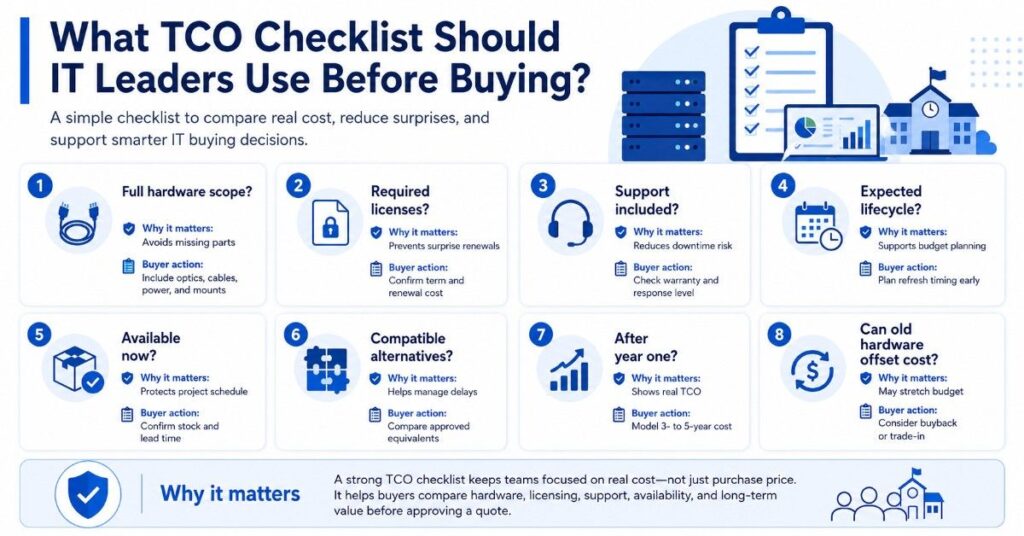
A TCO checklist helps teams compare options in a clear and consistent way. It also helps procurement and budget leaders understand why a quote may need more than base hardware.
| TCO Question | Why It Matters | Buyer Action |
| What is the full hardware scope? | Avoids missing parts | Include optics, cables, power, mounts |
| What licenses are required? | Prevents surprise renewals | Confirm term and renewal cost |
| What support is included? | Reduces downtime risk | Check warranty and response level |
| What is the expected lifecycle? | Supports budget planning | Plan refresh timing early |
| Is the product available now? | Protects project schedule | Confirm stock and lead time |
| Are alternatives compatible? | Helps manage delays | Compare approved equivalents |
| What happens after year one? | Shows real TCO | Model 3- to 5-year cost |
| Can old hardware offset cost? | May stretch budget | Consider buyback or trade-in |
This checklist works for switches, wireless APs, firewalls, servers, storage, cloud subscriptions, licensing, support, and maintenance. It keeps the conversation focused on real cost, not only purchase price.
IT leaders should also review risks. A cheaper option may require more labor. A higher-cost option may reduce support tickets. A subscription may simplify operations but increase renewal exposure.
How Should K-12 and SLED Buyers Compare OEM Options?
- Start with fit, not brand preference
- Cisco Catalyst, HPE Aruba, Fortinet, Juniper Mist, Juniper switching, and Arista each serve different roles across network, wireless, security, and data center environments
- Match the OEM to the specific project need rather than defaulting to a single vendor
- Compare key decision factors before selecting
- Compatibility with existing infrastructure
- Support and warranty coverage
- Performance and scalability
- Licensing model and renewal terms
- Lead time and availability
- Lifecycle and upgrade path
- Budget alignment
- Use a vendor-neutral evaluation approach
- Vendor-neutral does not mean all products are equal
- Each option should be evaluated based on how well it meets the project goal
- Focus on long-term value, not just initial pricing
- Align OEM strengths with project type
- Cisco Catalyst: standardized switching environments
- HPE Aruba: wireless and campus networking
- Fortinet: firewall and security-focused deployments
- Arista: high-performance switching for data center needs
- Consider sourcing and availability early
- Channel and distribution access can affect pricing and delivery timelines
- Availability of bundles, licenses, and compatible components may vary
- A strong sourcing partner can help compare options before timelines become tight
Need Help Comparing New, Refurbished, and Hard-to-Find Hardware?
CapEx, OpEx, and TCO planning becomes easier when buyers can compare real hardware options, lead times, support needs, and lifecycle costs before purchasing.
Catalyst Data Solutions helps schools, libraries, and public-sector organizations turn infrastructure needs into practical hardware scopes. Catalyst can compare OEM options, source products through channel and distribution access, and build quote-ready solutions for eligible infrastructure projects.
Ask Catalyst to compare new, refurbished, and hard-to-find options for switches, wireless access points, firewalls, optics, servers, storage, and refresh hardware. Catalyst can also help buyers review bundle pricing, compatibility needs, and sourcing options based on budget, timeline, and procurement requirements.
FAQs
What is the main difference between CapEx and OpEx in school IT budgets?
CapEx usually means a larger upfront hardware purchase, such as switches, APs, firewalls, or storage. OpEx usually means recurring costs, such as cloud subscriptions, licenses, support, and maintenance.
Why is TCO more useful than purchase price?
Purchase price only shows the first cost. TCO shows the full cost over time, including licenses, support, labor, downtime risk, upgrades, warranty, and replacement needs.
Can a cheaper switch have a higher TCO?
Yes. A cheaper switch can cost more over time if it needs extra modules, lacks support, creates compatibility issues, uses more labor, or reaches end of support sooner than expected.
Should K-12 schools use CapEx or OpEx for cloud tools?
Cloud tools are usually OpEx because they involve monthly or annual subscriptions. Schools should model multi-year renewal costs before moving major workloads or services into a cloud model.
How does refurbished hardware affect TCO?
Refurbished hardware can lower upfront cost for spares, replacements, labs, or expansion. Buyers should still check testing, warranty, compatibility, support, and funding rules before using it in a project.
How should E-Rate factor into TCO planning?
E-Rate can help with eligible connectivity and internal network infrastructure, but it does not cover every IT need. Schools should separate eligible costs from broader device, software, staffing, and security budgets.
What should procurement teams ask before approving a quote?
They should ask whether the quote includes all hardware, licenses, support, optics, cabling, power supplies, delivery timing, compatible alternatives, and renewal costs for the expected lifecycle.