Modern organizations no longer operate inside a defined perimeter. Users, devices, and applications move across cloud, on-premises, and remote environments every day. In this reality, traditional security models built around network boundaries are no longer sufficient.
Security incidents today are not isolated technical issues; they disrupt operations, impact revenue, and expose gaps in how access is controlled. As environments become more distributed, the challenge is no longer just keeping threats out, but controlling how access is granted and used.This is where Zero Trust becomes essential.
Instead of assuming trust based on location, Zero Trust focuses on identity, context, and continuous verification. Every access request is evaluated in real time, whether it originates inside the network or from an external source. This shift reflects how modern systems actually operate.
For IT leaders and security teams, the priority is clear: strengthen identity controls, limit access to only what is necessary, and improve visibility across users, devices, and applications especially in hybrid infrastructure design environments.
A practical Zero Trust approach is not about adding complexity. It is about making access decisions more precise, measurable, and aligned with real-world risk.
Zero Trust is a security model defined in NIST SP 800-207. It assumes that no user, device, or system should be trusted by default regardless of whether they are inside or outside the network.
The central idea is simple:
Never trust, always verify.
Every access request must be authenticated, authorized, and validated continuously. Trust is not granted based on network location but on identity, context, and risk.
Hybrid environments increase complexity. Users access systems from multiple devices and locations, while applications run across on-premises and cloud platforms.
In these conditions, perimeter-based models fail to provide sufficient protection. A stronger cybersecurity strategy must shift toward identity-driven security and granular access control.

Authentication should not be a one-time event. Continuous verification ensures that access remains valid throughout a session.
Multi-factor authentication (MFA) is critical. Microsoft reports that MFA can block more than 99.2% of account compromise attacks. Strong identity controls often rely on multi-factor authentication, with many environments using Microsoft Entra ID or WatchGuard MFA to reduce account compromise risk.
Users should only have access to the resources they need nothing more.
This reduces the attack surface and limits the impact of compromised credentials. Role-based and risk-based access policies are essential for enforcing this principle.
Network segmentation prevents attackers from moving laterally after gaining access.
Micro-segmentation isolates workloads, applications, and sensitive systems. This becomes especially important when organizations evaluate network cost optimization alongside security improvements.
Access decisions should include device posture checks. This means verifying:
Untrusted or non-compliant devices should be restricted or denied access.
Visibility is a core pillar of Zero Trust. Organizations must monitor all access activity in real time.
Continuous monitoring depends on clear visibility into vulnerabilities, which in many environments is supported by Tenable.
Not all data requires the same level of protection. Classifying data allows organizations to apply appropriate controls based on sensitivity.
This is especially important in environments relying on scalable data storage systems to manage growing workloads.
Manual processes slow down security operations and increase the chance of errors.
Automation ensures consistent enforcement of policies and faster response to changing risk conditions.
Zero Trust is not a one-time deployment. A phased approach reduces disruption and allows teams to refine controls over time, similar to structured cloud migration planning.
| Best Practice | Why It Matters |
| Continuous identity verification | Prevents unauthorized access even after login |
| Least-privilege access | Reduces attack surface and limits damage |
| Network segmentation | Stops lateral movement of attackers |
| Device health validation | Ensures only secure endpoints gain access |
| Continuous monitoring | Improves threat detection and response |
| Data classification | Protects sensitive information effectively |
| Policy automation | Ensures consistency and speed |
| Phased rollout | Minimizes operational disruption |
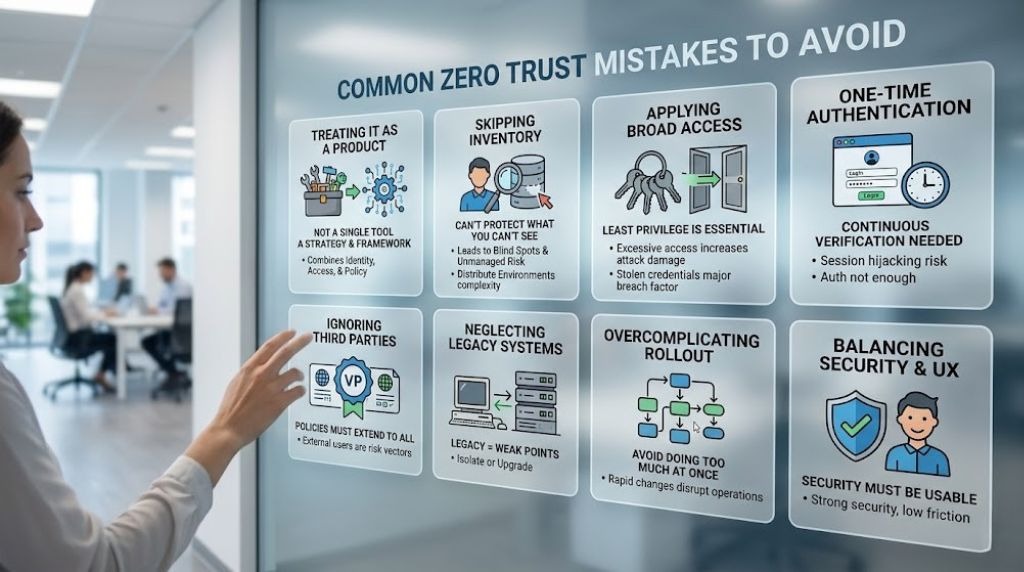
Zero Trust is not a single tool or solution. It is a framework that combines identity, access, visibility, and policy.
Relying on one product leads to gaps and incomplete protection.
You cannot protect what you cannot see.
Organizations often fail to maintain an accurate inventory of users, devices, and applications. This leads to blind spots and unmanaged risk, particularly in distributed environments facing networking complexity challenges.
Granting wide access rights undermines Zero Trust principles.
Verizon’s 2025 Data Breach Investigations Report highlights that stolen credentials remain a major breach factor. Excessive access makes these attacks more damaging.
Single authentication at login is not enough.
Attackers can hijack sessions after authentication. Continuous verification is necessary to reduce this risk.
Vendors often require access to systems and data. Without proper controls, they become a major risk vector.
Zero Trust policies must extend to all external users.
Legacy systems may not support modern security controls.
Ignoring them creates weak points in the environment. These systems should be isolated or upgraded.
Trying to implement everything at once leads to failure.
Complex policies and rapid changes can overwhelm teams and disrupt operations.
Excessive friction can lead users to bypass controls.
Security must be strong but usable. A balance is essential for long-term success, especially in environments supported by distributed endpoint protection tools.
| Mistake | Impact |
| Treating as a product | Incomplete security coverage |
| No asset inventory | Visibility gaps and unmanaged risk |
| Broad access policies | Increased attack surface |
| One-time authentication | Higher risk of session hijacking |
| Ignoring vendors | Third-party exposure |
| Legacy system neglect | Persistent vulnerabilities |
| Overcomplicated rollout | Delays and operational issues |
| Poor user experience | Workarounds and policy bypass |

Start by identifying:
This forms the foundation of your Zero Trust strategy.
Understand how users interact with systems.
Mapping access flows helps identify unnecessary access paths and dependencies.
Policies should consider:
This ensures access decisions are context-aware.
Identity is the core of Zero Trust.
Implement strong authentication and access control before expanding to other areas. This aligns with structured Zero Trust planning steps.
Once identity controls are in place:
Zero Trust evolves over time.
| Step | Action |
| 1 | Identify critical users and assets |
| 2 | Map access flows |
| 3 | Define access policies |
| 4 | Implement identity controls |
| 5 | Add monitoring and logging |
| 6 | Apply segmentation |
| 7 | Continuously refine policies |
Identity is the foundation of Zero Trust.
Use MFA, identity verification, and adaptive access controls. Many organizations rely on solutions like Microsoft Entra ID for centralized identity management.
Devices must meet security standards before accessing resources.
This is especially important for remote teams using distributed endpoint controls across modern work environments.
Segment networks to isolate workloads and reduce risk.
Secure access across distributed networks is often enforced through SASE architectures, with many organizations relying on Palo Alto Networks or Fortinet.
Applications should enforce strong authentication and authorization.
Access should be limited based on role and context, not network location.
Data must be encrypted, classified, and monitored.
Strong data protection is critical in environments aligned with modern security compliance practices.

Measure how well access policies prevent unauthorized access.
Metrics include:
Evaluate how much of your environment is monitored.
Gaps in visibility indicate areas of risk. Organizations often enhance this through centralized monitoring approaches similar to a managed SOC model.
Track reductions in:
Security should not disrupt productivity.
Monitor:
| Metric | What It Indicates |
| Failed access attempts | Strength of access controls |
| Monitoring coverage | Visibility across systems |
| Risky access reduction | Improvement in security posture |
| User friction levels | Balance between security and usability |
Zero Trust is an ongoing security model rather than a one-time deployment, continuously evolving alongside changing environments and threats through regular monitoring, policy updates, and refinement.
The most effective implementations prioritize strong identity verification, access control, and visibility, as these pillars form the foundation of long-term security. By avoiding common pitfalls, organizations can implement Zero Trust more effectively while minimizing disruption.
Catalyst Data Solutions Inc can help you assess security gaps, improve identity and access controls, and plan a practical Zero Trust strategy for your environment.
Zero Trust is based on continuous verification, least-privilege access, and strong visibility across users, devices, and systems.
Treating it as a product instead of a strategy is the most common mistake. Zero Trust requires a comprehensive approach.
No. Organizations of all sizes can implement Zero Trust principles based on their needs and resources.
Start with identity and access management. Strong authentication and access control provide the foundation for other controls.
It limits access to only what is necessary, reducing the impact of compromised accounts.
No. It complements existing tools by adding identity-based and context-aware controls.
Policies should be reviewed regularly, especially when systems, users, or threat conditions change.